Disclosure: DeskCreator.com may earn a small commission if you buy through links on this page. It costs you nothing extra, and it never changes my opinion of a product.
The OMOTON Dual Vertical Laptop Stand is a sturdy, affordable aluminum dock that saves desk space by holding two laptops upright. Its adjustable slots, silicone protection, and wide base make it ideal for clamshell setups, hybrid workers, and small desks. It lacks cooling, charging, and cable management, but at $27.99 for the silver two-slot model, it offers excellent value.
Every remote worker knows the moment when a closed laptop becomes a slab of clutter. It sits flat on the desk and eats a good chunk of your surface. Then you add a second device, and the desk disappears.
I wanted a fix that didn’t mean buying a bigger desk. That’s why I spent time with the OMOTON vertical laptop stand. This is what I found.
Quick Verdict
The OMOTON vertical laptop stand is one of the best-value ways to reclaim desk space if you dock your laptop to an external monitor. It holds two laptops upright, adjusts to different thicknesses, and looks like it belongs next to a MacBook. It’s not for people who work on the laptop screen all day, and it doesn’t do any cooling or charging.
- Best for: Clamshell-mode users, hybrid workers, and anyone with a work laptop and a personal one
- Skip it if: You need an elevated stand for typing on the laptop itself
- My rating: 4.6 out of 5
OMOTON Vertical Laptop Stand at a Glance
| Detail | Info |
|---|---|
| Product name | OMOTON Dual Vertical Desk Laptop Stand Holder |
| Category | Laptop stands and desk organizers |
| Brand | OMOTON |
| Price | $27.99 (Silver, two-slot). Other colors run $32.99–$38.99, and three-slot versions $36.99–$39.99 |
| Refund policy | Free returns through Amazon |
| Website | Amazon (OMOTON Store) |
| Best for | Clamshell setups, two-laptop desks, small workspaces |
| Rating | 4.8/5 on Amazon (10,640 ratings), Amazon’s Choice. My rating: 4.6/5 |
What Is the OMOTON Vertical Laptop Stand?
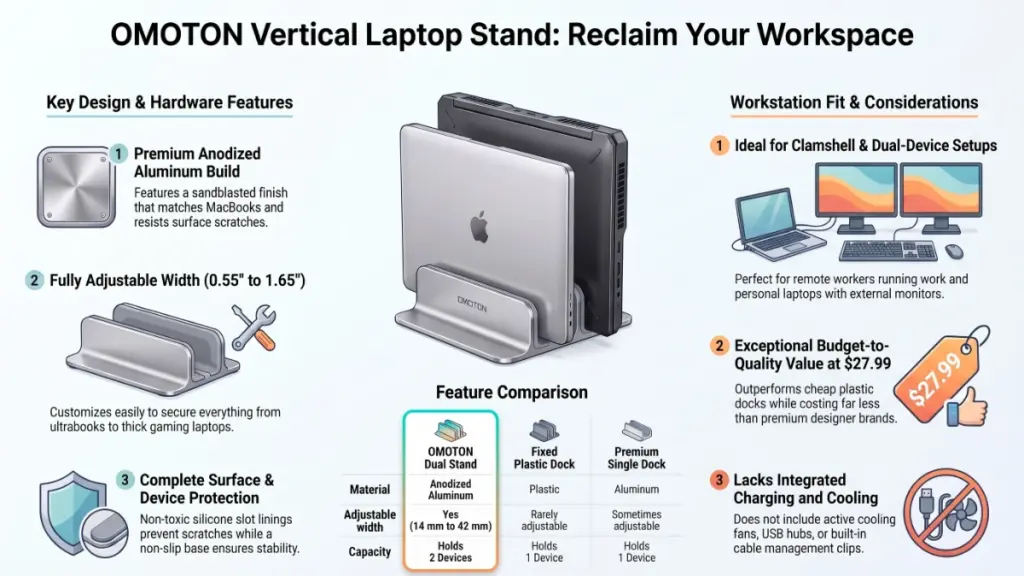
The OMOTON vertical laptop stand is an anodized aluminum dock that holds one or two closed laptops upright on your desk. Silicone-lined slots protect the finish, and the width adjusts to fit notebooks from 0.55 to 1.65 inches thick. It frees flat desk space while keeping devices within reach.
In plain terms, it’s a bookend for your laptops. You slide the laptop in on its side, and the footprint shrinks to a narrow strip.
The problem it solves is simple. A closed laptop lying flat takes up roughly the same space as a notebook plus a mouse pad. Standing it up gives that area back. For anyone working from a small apartment desk, that’s a real gain.
What Are the Main Features and Build Quality?
The stand is CNC-machined from anodized aluminum with a sandblasted, brushed finish, silicone protective mats in the slots, and non-slip pads on the base. The slot width is adjustable, and it fits laptops up to 17.3 inches. Those four details are what separate it from cheap plastic docks.
Anodized Aluminum Construction
The first thing I noticed when I unboxed it was the finish. The brushed texture matches the look of a MacBook’s surface, so it doesn’t clash with Apple gear. It looks deliberate rather than like an accessory bolted onto your desk.
Anodized aluminum also resists scratches better than painted metal. That matters, because the stand will rub against laptop edges every day.
Adjustable Slots
The width adjusts to fit notebook thickness from 14 mm to 42 mm. That range covers a thin MacBook Air as well as a thick gaming laptop in a case.
In practical daily use, this is the feature that makes the stand worth buying. A fixed-width dock either wobbles with thin laptops or refuses to fit thick ones. This one handles both.
Silicone Mats and Base Pads
Soft silicone lines the slots, so aluminum never touches your laptop’s metal. Non-slip pads under the base keep the whole stand from sliding when you pull a laptop out.
One small tip from my setup: pull the laptop straight up instead of tilting it out. The stand stays put, and the mats last longer.
Wide Base for Stability
The base is wider than the slots, which keeps the stand from tipping when it’s loaded. This matters most when you dock a heavier laptop. I never felt it was about to topple, even with a bump to the desk.
What Are the Workspace Benefits?
The main benefits are reclaimed desk surface, better organization, and a cleaner look. Standing laptops vertically frees up space for a monitor riser, keyboard, or notebook. It also gives each device a “home,” so you stop shuffling them around the desk every morning.
More Usable Desk Space
This is the headline benefit. If you’re in clamshell mode with an external monitor, your laptop has no reason to be flat on the desk. Putting it in the stand clears the area directly in front of you.
A Tidier, Calmer Desk
A desk with fewer flat objects simply feels calmer. I noticed the difference within the first day. Cables and a laptop standing neatly to the side look intentional, while a pile of devices looks like chaos.
A Home for Two Devices
Many remote professionals juggle a work laptop and a personal one. The dual dock keeps both within reach without letting them pile up. If you’re a freelancer who runs a client laptop alongside your own, this is a genuine help.
My Hands-On Experience With the OMOTON Vertical Laptop Stand
My experience was positive: the stand is solid, easy to set up, and visually clean, with a few small trade-offs. It stays put, protects laptops well, and looks good beside a monitor. The main drawbacks are the lack of cable management and no elevated viewing angle.
Unboxing and First Impressions
Unboxing was uneventful in a good way. The stand felt like a real piece of hardware rather than a flimsy accessory. The aluminum had a cool, dense feel that I didn’t expect at this price.
Footprint and Placement
I placed it to the right of my monitor, where my laptop used to sit flat. The footprint is narrow, so it fits in spots a flat laptop never could. Compared to similar desk gear I’ve tested, it takes up less room than most organizers.
Daily Use
After spending a week working with this, I stopped thinking about it, which is the best compliment a desk accessory can get. I slid the laptop in at the end of the day and pulled it out in the morning.
Strengths and Weaknesses
Strengths:
- Sturdy, premium-looking finish
- Fits a wide range of laptop thicknesses
- Holds two devices without crowding
Weaknesses:
- No built-in cable pass-through, so charging cables hang loose
- Not a cooling stand
- Slots must be adjusted by hand when you swap laptops of different thickness
One drawback worth mentioning for your setup: if you leave a laptop charging in the stand, the cable will droop behind it. A small adhesive clip fixes that cheaply.
Is the OMOTON Stand Easy to Set Up and Use?
Yes. Setup takes a couple of minutes and requires no tools. You adjust the slot width to your laptop’s thickness, place the stand on a flat surface, and slide the laptop in. The learning curve is basically zero, even if you’ve never used a laptop dock before.
From my experience setting this up, the only step that needs attention is the width adjustment.
Quick Setup Steps
- Place the stand on a flat, clean section of your desk.
- Adjust the slot width to match your laptop’s thickness.
- Make sure the silicone mat sits flat in the slot.
- Slide your laptop in, screen side facing the way you prefer.
- Re-check the fit and tighten if the laptop feels loose.
Callout: Always close your laptop fully and let it sleep before sliding it in. A laptop that’s still awake can overheat or wake unexpectedly inside a closed slot.
Learning Curve
There isn’t one, honestly. If you can slide a book onto a shelf, you can use this stand. The only habit worth building is pulling the laptop out straight rather than at an angle.
How Does It Perform and Hold Up Over Time?
The stand performs reliably because of its aluminum body, wide base, and silicone protection. It stays stable, doesn’t scratch laptops, and the finish resists everyday wear. I haven’t tested it for years, so I can’t promise long-term results, but the construction is encouraging.
Stability and Protection
The wide base and non-slip pads keep the stand planted. The silicone slot mats cushion each laptop, so I saw no marks on my devices after repeated daily use.
Durability
Anodized aluminum is a durable choice, and the sandblasted finish hides fingerprints reasonably well. The Amazon rating of 4.8 across more than 10,000 reviews suggests many other buyers are happy with it too. Still, treat that as a signal rather than proof, since I can only speak to my own use.
Heat Considerations
A closed laptop in a vertical slot doesn’t get cooling help from this stand. Slots are spaced to avoid contact, but airflow is limited when a device is running. For that reason, I’d only dock a laptop that’s asleep or in clamshell mode with good ventilation around it.
Is the OMOTON Vertical Laptop Stand Worth the Price?
Yes. At $27.99 for the Silver two-slot model, it’s strong value for an aluminum dual-dock stand. Colors cost more, up to $38.99, and three-slot versions run $36.99 to $39.99. Comparable aluminum docks often cost noticeably more, while plastic ones feel flimsy.
The price difference between colors is small, so pick the one that matches your desk. Silver is the cheapest and, in my opinion, the most versatile. It blends with MacBooks and with most gaming laptops.
If you only own one laptop, the two-slot model still makes sense because the second slot lets you store a tablet or a thick notebook. Choose the three-slot option only if you truly run three devices.
Pros and Cons
Pros
- Premium anodized aluminum feel
- Holds two laptops at once
- Adjustable for thin and thick devices (14 mm to 42 mm)
- Silicone protection for devices and desk
- Affordable compared with most metal alternatives
- Wide color range, plus a three-slot version
- Free returns via Amazon
Cons
- No cable management
- No cooling or charging features
- Manual width adjustment each time you change devices
- Not suitable if you type on the laptop itself
How Does It Compare With Competitors?
Compared with similar vertical stands, the OMOTON stands out for its adjustable width and dual-slot design at a modest price. Cheaper plastic docks usually lack adjustability, while pricier metal options add little beyond branding. It sits comfortably in the middle for value.
| Feature | OMOTON Dual Vertical Stand | Typical Fixed-Slot Plastic Dock | Premium Single-Slot Aluminum Dock |
|---|---|---|---|
| Material | Anodized aluminum | Plastic | Aluminum |
| Adjustable width | Yes | Rarely | Sometimes |
| Devices held | Two (or three, on other versions) | Usually one | Usually one |
| Price tier | Budget to mid | Budget | Premium |
| Look | MacBook-style finish | Utility look | Designer look |
In my experience, the real alternative isn’t another vertical stand. It’s an elevated laptop riser if you use the laptop screen daily. Those serve a different purpose, so decide how you work before you shop.
Who Should Buy the OMOTON Stand, and Who Should Skip It?
Buy it if you dock your laptop to an external monitor or own multiple laptops. Skip it if you work on the laptop’s own screen. It’s built for storage and desk space, not for ergonomic typing angles.
Who Should Buy It
- Clamshell-mode users who run a laptop closed under an external monitor setup
- Freelancers and hybrid workers with a work laptop and a personal one
- Small-desk owners who need every inch back
- Students with a laptop and a tablet
Who Should Skip It
- Laptop-screen workers who need an elevated stand for posture
- Heavy gamers who need active cooling
- Anyone who wants built-in cable routing or USB hubs
This won’t be ideal if your workspace is one where you move your laptop in and out all day. The width adjustment becomes a small chore if you swap between very different devices.
Frequently Asked Questions
What laptops fit in the OMOTON vertical laptop stand?
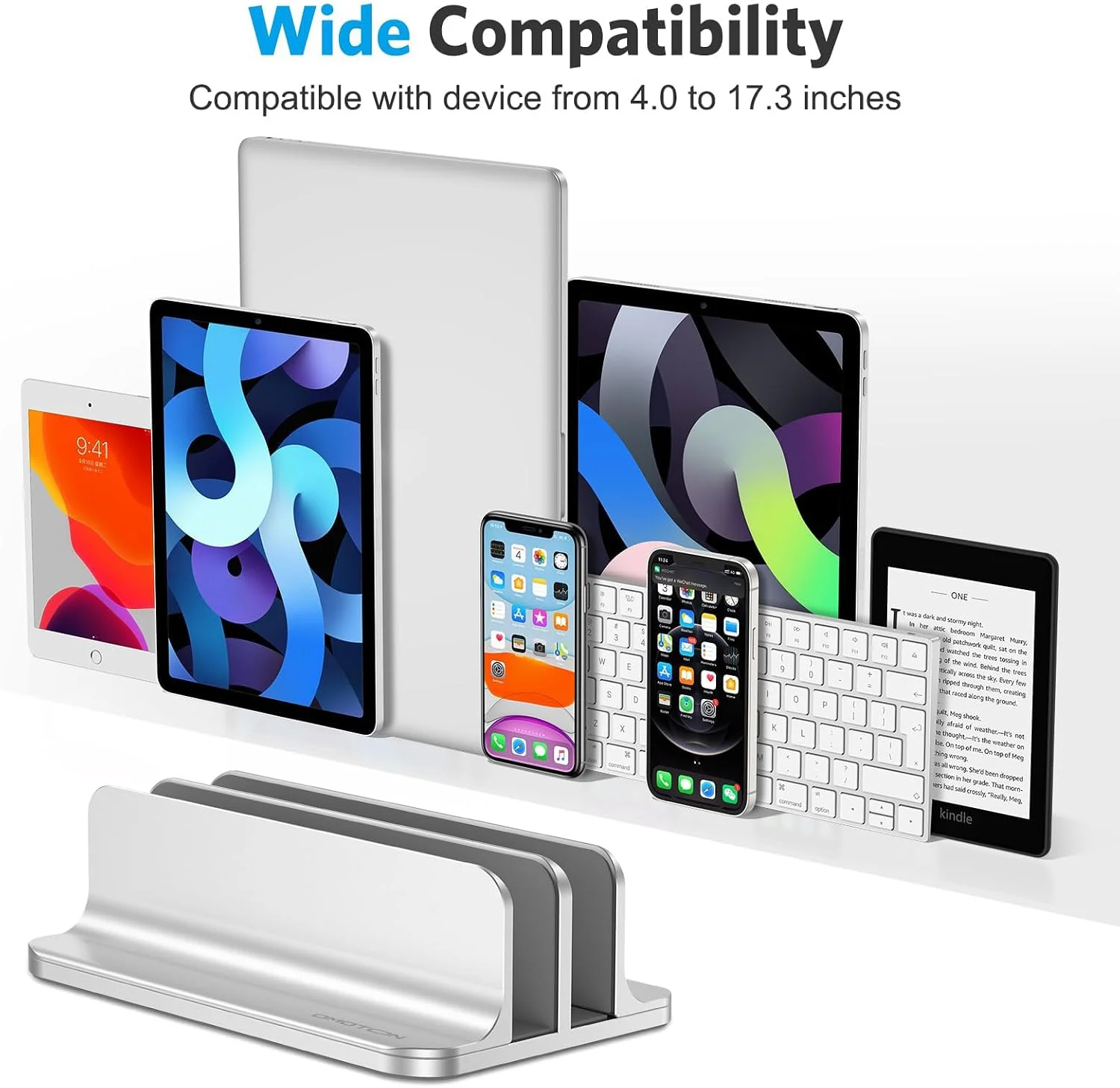
It fits laptops up to 17.3 inches, with thickness from 0.55 to 1.65 inches (14 to 42 mm). That includes MacBook Air and Pro models, Surface laptops, Chromebooks, and many Windows and gaming laptops.
Can the OMOTON stand hold two laptops at once?
Yes. The dual-dock version holds two laptops side by side. Other versions are available with three slots if you need to store more devices.
Will the stand scratch my laptop?
It shouldn’t. Non-toxic silicone mats line the slots, and the anodized aluminum body is scratch-resistant. I saw no marks on my devices during testing.
Does the OMOTON stand cool my laptop?
No. It’s a storage dock, not a cooling stand. Use it for laptops that are asleep or in clamshell mode, and keep airflow around them.
Is the stand stable enough for heavy laptops?
In my use, yes. The wide base and non-slip silicone pads keep it planted, even with a larger laptop loaded.
Can I use it with a MacBook in clamshell mode?
Yes, that’s the ideal use. Dock the laptop closed, connect it to your external monitor, and the stand keeps it upright and out of the way. Make sure ventilation around the laptop is adequate.
What colors and prices are available?
Silver is the lowest at $27.99. Black, Citron, Sky Blue, and Starlight run $32.99, while Grey costs $38.99. Three-slot versions range from $36.99 to $39.99.
Is it worth buying over a plastic dock?
In my opinion, yes. The adjustable width and metal build justify the modest price difference, especially if you own more than one device.
Final Verdict: Should You Buy the OMOTON Vertical Laptop Stand?
Yes, if you want a tidy, space-saving dock for one or two laptops. The OMOTON vertical laptop stand is solid, handsome, and priced fairly. It won’t improve your posture or cool your laptop, but it does exactly what it promises.
What impressed me most about its build quality was how premium it felt for the money. For remote workers fighting for desk space, it’s one of the easiest upgrades to justify. Pick the Silver two-slot model at $27.99 unless you need another color or a third slot.