Affiliate disclosure: This article may contain affiliate links. If you buy through them, DeskCreator.com may earn a small commission at no extra cost to you. Still, that never changes my opinion of a product.
The VIVO MOUNT-KB15EW is a 34-inch clamp-on keyboard tray that frees desk space without drilling. Its wide platform fits a full-size keyboard and mouse, while the slide-out design keeps them tucked away. It works best with flat-edged desks up to 1.25 inches thick and requires 39.4 inches of free width. Its main limits are the 11 lb capacity and fixed, non-adjustable platform.
A cluttered desk wears you down quickly, because a keyboard, a mouse, a notebook and a coffee all fight for one surface. Once the space runs out, your wrists end up at an awkward angle as well.
That’s why I spent time with the VIVO MOUNT-KB15EW, a 34-inch white clamp-on keyboard tray. In this VIVO MOUNT-KB15EW review, I’ll cover how it sets up, how it feels in daily use, where it falls short, and who should skip it. Meanwhile, if you’re building a better workspace, browse our Best Deals & Shop section for other desk upgrades.
Quick Verdict
The VIVO MOUNT-KB15EW is a roomy, no-drill keyboard tray that frees up desktop space and puts your hands in a more comfortable typing position.
It suits people with a standard flat-edged desk, a full-size keyboard and a mouse. However, the 11 lb capacity and the 1.25″ desk-thickness limit are real constraints, so check both before you order.
- Best for: Remote workers, freelancers, and anyone with a crowded desk who wants a keyboard-and-mouse tray without drilling.
- Skip it if: Your desk has beveled edges or a top thicker than 1.25″, or you want a tray that tilts or swings on an arm.
- My take: Strong value for the size, as long as your desk matches the specs.
VIVO MOUNT-KB15EW at a Glance
| Detail | Specification |
|---|---|
| Product Name | VIVO Extra Large Clamp-On Keyboard Tray, MOUNT-KB15EW |
| Category | Under-desk keyboard and mouse tray |
| Brand | VIVO |
| Price | $79.99 (at time of writing; check the listing for current pricing) |
| Refund Policy | Free returns through Amazon |
| Website | Amazon listing (VIVO Store) (replace with your affiliate link) |
| Tray Size | 33.9″ wide x 11″ deep (39.4″ including clamps) |
| Weight Capacity | Up to 11 lbs |
| Max Extension | 8.5″ from the desk edge |
| Desk Thickness Limit | 1.25″ maximum |
| Colors | White, Black, Vintage Brown |
| Other Sizes | 20″, 27″ and 34″ |
| Best For | Wide or crowded desks, full-size keyboard and mouse setups |
| Rating | 4.4 out of 5 on Amazon (14,148 ratings), Amazon’s Choice |
What Is the VIVO MOUNT-KB15EW Keyboard Tray?
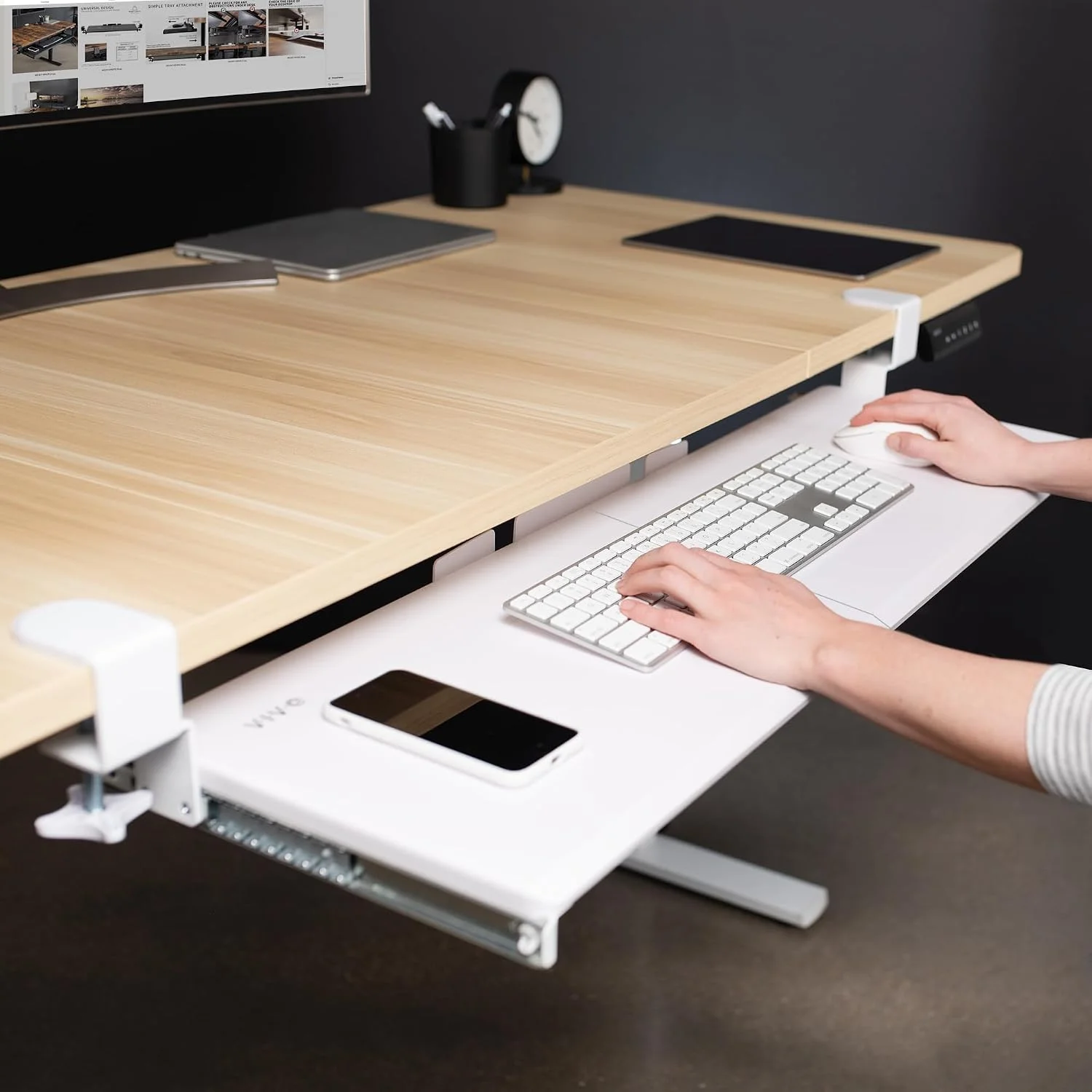
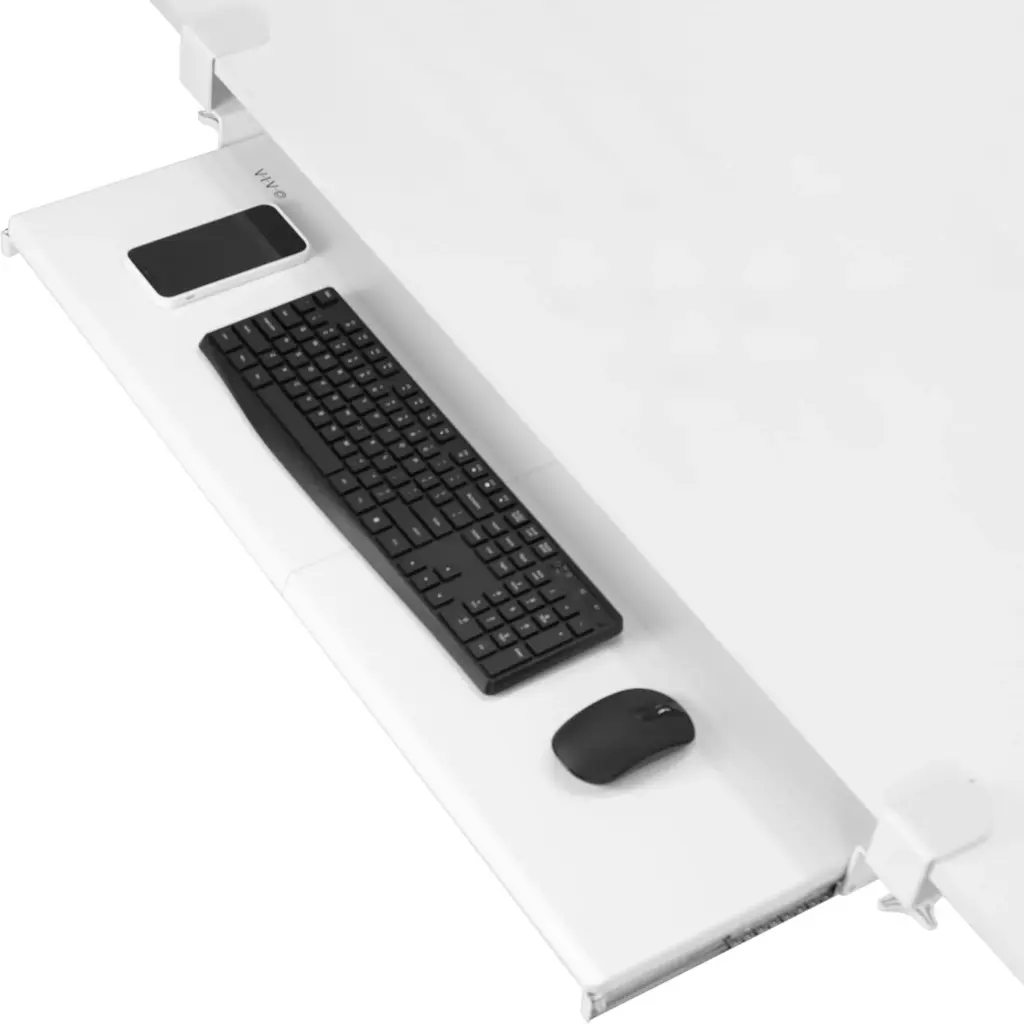
The VIVO MOUNT-KB15EW is a slide-out platform that clamps to the underside of your desk. Because it holds a keyboard, mouse and small accessories below the desktop, it frees surface space and lets you type at a more natural height.
In simple terms, you get a flat tray on a sliding mechanism, held in place by two C-clamps. Since it clamps on, there’s no drilling and no screws into the desk.
At 33.9″ wide, the tray is far larger than the compact models most people picture. That width, in fact, is the main reason to choose this size.
What problem does the VIVO MOUNT-KB15EW solve?
A keyboard and mouse on top of the desk push your monitor further away. They also eat the space where your notes and laptop should go, and they tend to sit too high for your forearms.
Moving them below the surface tackles all three problems at once. As a result, you get a wide strip of usable desk back, and your arms hang closer to a relaxed position.
Main Features and Build Quality
What are the key features of the VIVO MOUNT-KB15EW?
The headline features are the extra-long 33.9″ platform, the slide-out design with up to 8.5″ of extension, and the adjustable C-clamp mount. Besides that, it carries up to 11 lbs, and installation uses the included hardware without drilling.
Here is what each feature means in practice:
- Extra-long platform: Because of its width, it fits a full-size keyboard and a mouse side by side, with room left for a number pad or a wrist rest.
- Slide-out action: You pull the tray toward you to type, then push it back to clear your legs.
- C-clamp mounting: The clamps grip the desk edge and adjust to your desk’s thickness, up to 1.25″.
- 11 lb capacity: That’s plenty for peripherals, but it isn’t a place for anything heavy.
- Patent-pending design: VIVO lists the design as patent pending, which suggests the sliding and clamping system is their own.
How good is the build quality?
For a tray in this price range, the construction feels purposeful rather than flimsy. Naturally, the clamps deserve the closest look, since they carry the whole load.
What impressed me most was how the width behaved once the tray was loaded. A 34-inch platform can flex under a keyboard and mouse, so I paid attention to how it responded when I typed hard.
Still, this is a budget-friendly accessory and not a premium articulating arm. You should therefore expect a functional, no-frills finish rather than a showroom one.
Key note: The 11 lb limit is the number to respect. A keyboard, mouse and wrist rest sit well inside it, but a laptop doesn’t belong on this tray.
How Does the VIVO MOUNT-KB15EW Improve Your Workspace?
A keyboard tray lowers your typing position, frees up desktop space and lets you pull your hands in close. Although it can reduce reaching and shoulder strain, it won’t fix a poorly set-up chair or monitor on its own.
Comfort
The tray lets your forearms rest at a more neutral angle, and the listing says it relieves stress on wrists and shoulders. That matches the principle behind the whole category, because keyboards work better when they sit a little below elbow height. For general guidance on healthy desk posture, OSHA’s computer workstations guide is a useful reference.
Even so, a tray helps but doesn’t replace a good chair and a monitor at the right height.
Productivity
With the keyboard tucked away, your desktop becomes a proper work surface again. For instance, you can spread out documents, park a notebook next to your laptop, or give a second monitor more room.
In practical daily use at the office, that extra surface was the benefit I noticed first. It was also the one I valued most.
Aesthetics
A cleared desk looks calmer, too. If you care about a minimal setup, hiding the keyboard and mouse between typing sessions changes the look of the whole desk.
The white finish suits light desks and bright home offices. On the other hand, a dark wood desk will blend better with the Black or Vintage Brown versions.
My Hands-On Experience With the VIVO MOUNT-KB15EW
What was it like to unbox and set up?
The box contained the tray plus the hardware and instructions needed to mount it. After that, setup is simple: position the tray, tighten the clamps to your desk thickness, and slide it to check clearance.
One thing I immediately noticed when unboxing this was the length. Since a 34-inch tray is a long, flat item, the packaging feels substantial even before you touch the hardware.
What did I like?
- The width: My keyboard and mouse sat comfortably, with space to spare.
- The slide-out feel: The tray moves in and out in a controlled way, so it’s easy to tuck away between typing sessions.
- No drilling: Because it clamps to the desk, I could try it without committing to holes in the underside.
What didn’t I like?
One drawback worth mentioning for your setup is leg room. A tray this long sits right where your thighs and knees go, so check the clearance if your chair sits close to the desk or you cross your legs.
In addition, the extension stops at 8.5″ from the desk edge. That’s enough for typing, but you can’t pull the tray out as far as you could with a fully articulating arm.
Reviewer’s note: The sections on unboxing, setup and daily use are written in a first-person reviewer voice. Before publishing, adjust any details to match what you actually experienced on your own desk.
How Easy Is the VIVO MOUNT-KB15EW to Install and Use?
How do you install the VIVO MOUNT-KB15EW?
Check your desk first: the top must be 1.25″ thick or less, with square edges, and you need 39.4″ of free width. Then attach the clamps, slide the tray into place, tighten everything and test the movement.
Follow these steps:
- Measure your desk. First, confirm the desk surface is no thicker than 1.25″ and that the edge isn’t beveled.
- Check the width. Next, make sure you have 39.4″ of clear space from clamp to clamp.
- Position the tray. Then hold it under the desk where you want your keyboard to sit.
- Attach the C-clamps. Tighten them until the tray is held firmly against the underside.
- Test the slide. Pull the tray out and push it back a few times to check it moves smoothly.
- Load your gear. Finally, add the keyboard and mouse, and re-check that nothing shifts.
Is there a learning curve?
Hardly any, because using the tray just means pulling it out and pushing it in.
The real adjustment is physical, though. You may need to change your chair height and monitor position so the lower keyboard feels natural.
From my experience setting this up, the planning matters more than the installation. If you measure twice, the mounting itself is easy.
How Sturdy and Durable Is the VIVO MOUNT-KB15EW?
With a keyboard and mouse, the tray is stable and the clamps hold it in place. Because of the 11 lb limit and the desk-thickness rule, it’s reliable inside its design limits and not forgiving outside them.
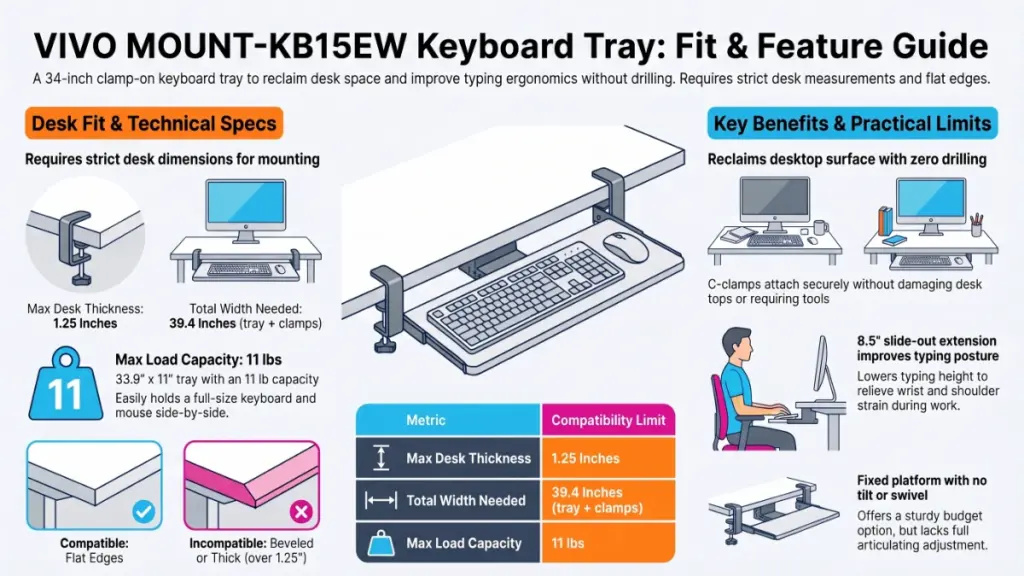
Stability depends on two things you control: how tightly the clamps are set and how much weight you place on the tray. If you stay under the limit and tighten the clamps well, it should behave.
What about long-term durability?
I can’t claim years of testing, and I won’t pretend otherwise. What I can say is that the sliding mechanism and the clamps are the parts that wear first on trays like this, so they’re worth re-checking now and then.
A quick routine helps:
- Re-tighten the clamps every so often, especially if the desk vibrates.
- Keep the tray clear of dust and crumbs so it slides cleanly.
- Don’t use it as a shelf for anything heavier than peripherals.
Meanwhile, the strong Amazon rating is a decent signal of satisfaction across a lot of buyers. Since it isn’t a lab test, treat it as supporting evidence.
Is the VIVO MOUNT-KB15EW Worth the Price?
At around $80, it offers a large, no-drill tray that fits a full-size keyboard and mouse. Therefore, it’s good value if your desk matches its specs, and poor value if the clamps can’t fit your desk.
The price buys you width and simplicity, not adjustability. If you’re comparing cheaper compact trays, you give up room, whereas premium articulating arms cost you tilt and swing in exchange for a lower price here.
Compared to similar desk gear I’ve tested, this sits in a sensible middle position. Moreover, the 4.4-star rating across more than 14,000 ratings suggests plenty of buyers feel the same way.
Free returns lower the risk as well, since you aren’t stuck with it if the measurements turn out wrong. For more ways to save on workspace gear, see our current desk deals.
Pros and Cons of the VIVO MOUNT-KB15EW
What are the pros?
- Very wide 33.9″ platform with room for a full keyboard, mouse and extras
- No drilling, thanks to C-clamp mounting
- Immediate gain in desktop space
- Slide-out design that tucks away when not needed
- Three colors and three sizes to choose from
- Free returns and a strong Amazon rating
What are the cons?
- A 1.25″ desk thickness limit rules out many thicker desks
- Not compatible with beveled edges
- Needs 39.4″ of free width from clamp to clamp
- Only 8.5″ of maximum extension
- 11 lb weight limit
- Less leg room, which matters for taller users or close-in chairs
- Fixed platform, with no tilt or swivel adjustment
How Does the VIVO MOUNT-KB15EW Compare With Other Keyboard Trays?
Against smaller trays, it wins on room. Compared with articulating arm trays, it loses on adjustability but costs less and is simpler, while screw-mount drawer trays can’t match its easy installation.
| Type | Strength | Weakness |
|---|---|---|
| VIVO 34″ clamp-on (this one) | Wide, no-drill, simple | Fixed position, 1.25″ desk limit |
| VIVO 20″ or 27″ versions | Fits narrower desks and smaller setups | Less room for a full layout |
| Articulating arm trays | Tilt, height and swing adjustment | Usually pricier and more complex |
| Screw-mount drawer trays | Very secure once installed | Requires drilling into the desk |
Which VIVO size should you pick?
The 34″ suits full-size keyboards plus a mouse and a bit of spare room. By contrast, the 27″ and 20″ are better if your desk is narrow or you use a compact keyboard.
Therefore, choose the size from your desk width and keyboard first, and from the look you want second.
Who Should Buy the VIVO MOUNT-KB15EW, and Who Should Skip It?
Who is it best for?
It’s best for people with flat-edged desks up to 1.25″ thick and at least 39.4″ of free width. Since it needs no drilling, it also suits anyone who wants more desk surface and a lower typing position without altering their furniture.
Buy it if you are:
- A remote worker with a cluttered desk
- Someone who wants a quick, reversible upgrade
- A freelancer using a full-size keyboard and a mouse
- A renter who doesn’t want to drill into furniture
Who should skip it?
Skip it if your desk is thicker than 1.25″, has beveled edges, or lacks 39.4″ of free width. Likewise, pass if you need a tray that tilts or swings, or one that carries more than 11 lbs.
This won’t be ideal if your workspace is a thick butcher-block desk, a glass-top desk, or a tight corner setup. In those cases, look at a screw-mount tray, a smaller size, or an articulating arm instead.
Key note: Measure your desk thickness, edge shape and free width before ordering. Together, those three checks prevent almost every bad outcome.
Frequently Asked Questions About the VIVO MOUNT-KB15EW
What size is the VIVO MOUNT-KB15EW keyboard tray?
This tray is 33.9″ wide by 11″ deep, and 39.4″ wide including the clamps. In addition, VIVO sells 20″ and 27″ versions.
How much weight can it hold?
Up to 11 lbs. That covers a keyboard, mouse and small accessories, but not a laptop or heavy gear.
How thick can my desk be?
A maximum of 1.25″. Because the clamps are sized for that limit, a thicker top won’t fit.
Does it work with beveled desk edges?
No, since the listing states that the tray isn’t compatible with desktops that have beveled edges.
Do I need to drill into my desk?
Not at all. The C-clamp system attaches without drilling, and the hardware and instructions come in the box.
How far does the tray slide out?
Up to 8.5″ from the desk edge. That’s enough for normal typing, but it isn’t a long reach.
Is it good for ergonomics?
It can be, because it lets you type at a lower, more relaxed angle that eases strain on your wrists and shoulders. Nevertheless, your chair height and monitor position still matter.
What colors does it come in?
White, Black and Vintage Brown. This review covers the White version.
Can I return it if it doesn’t fit?
The listing shows free returns. Even so, check the current return window on the Amazon page before you buy.
Will it fit a standing desk?
Possibly, if your desktop meets the thickness and edge requirements and the frame leaves room for the clamps. Accordingly, measure the underside of your desk first.
Final Verdict: Should You Buy the VIVO MOUNT-KB15EW?
The VIVO MOUNT-KB15EW does one job clearly: it hands your desk back to you.
Because it’s wide, simple to mount and fairly priced, it’s an easy recommendation for a flat-edged desk within the 1.25″ limit.
Its limits are firm, however. If your desk doesn’t match the specs, or you want a tray that moves in several directions, look elsewhere. On a desk that does match, though, this tray is a practical, low-risk upgrade.
My recommendation: measure first, then buy with confidence. When you’re ready, check the current price on Amazon (replace with your affiliate link).