The T4TREAM 60-inch L-shaped executive desk combines a large corner workspace, four drawers, a cabinet, CPU compartment, and built-in charging. Its engineered-wood construction and large footprint have trade-offs, but the feature set makes it suitable for storage-heavy home offices and dual-monitor setups.
If your workspace is currently a small table, a laptop, and a tangle of chargers, an L-shaped desk changes how the room works. First, you get one surface for your main monitors and a second for paperwork or a laptop. Better still, storage and power sit within arm’s reach.
The T4TREAM 60-inch L-shaped executive desk aims to deliver all of that for $389.99. In addition to the corner layout, it has a fluted front panel, a built-in charging station, four drawers, and a cabinet.
To find out whether it earns its price, I went through the specs, compared them with what buyers should expect in this range, and worked out who will love it and who should look elsewhere.
Affiliate disclosure: DeskCreator.com may earn a small commission if you buy through links in this article, at no extra cost to you. That does not change my assessment, and I list the drawbacks right alongside the strengths.
Quick Verdict
The T4TREAM 60-inch L-shaped desk is a good pick for people who want a large corner workspace with built-in power and plenty of storage, without paying premium-furniture prices. It suits dual-monitor setups, paperwork-heavy jobs, and anyone tired of cable clutter.
However, it is a weaker fit for small rooms, standing-desk fans, and buyers who want solid wood. Likewise, the listing leaves several practical details unstated, so I point those out below.
- Best for: Remote workers, freelancers, students, and small-business owners with a dedicated corner
- Skip if: You need height adjustment, a compact footprint, or all-solid-wood construction
- Rating on Amazon: 4.5 out of 5 from 71 ratings at the time of writing
T4TREAM L-Shaped Desk at a Glance
| Detail | Info |
|---|---|
| Product name | T4TREAM 60-Inch Modern Fluted L-Shaped Executive Desk |
| Category | L-shaped executive / corner computer desk |
| Brand | T4TREAM |
| Price | $389.99 (Dark Walnut, Alder Grey, and Natural Oak all listed at the same price) |
| Payment options | Amazon lists 4 payments of $97.50 every 2 weeks; $50 off ($339.99) on approval for the Amazon Visa |
| Dimensions | 60″D x 60″W x 30″H |
| Top material | Engineered wood (P2 MDF; the listing cites FSC-certified wood) |
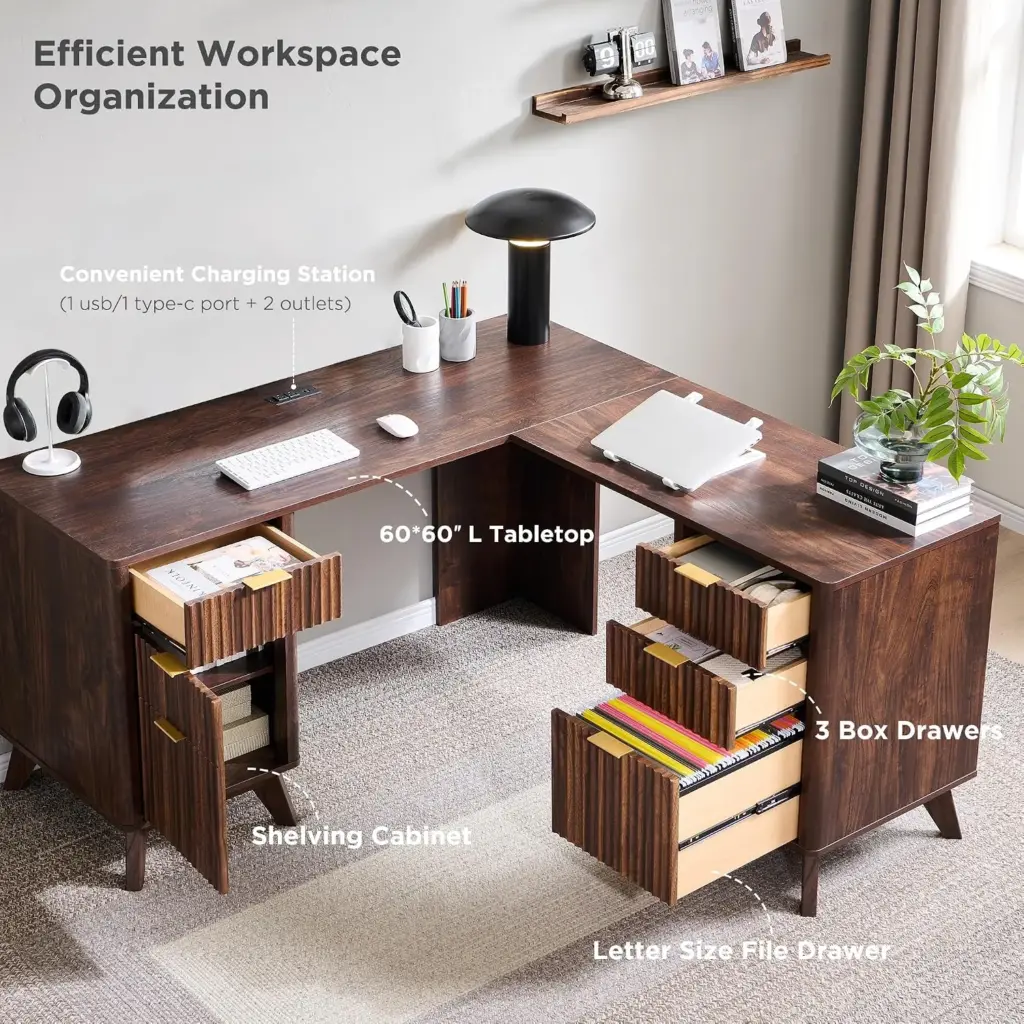
| Storage | 1 letter-size file drawer, 3 utility drawers, 1 cabinet with adjustable shelf, CPU compartment |
| Power | 1 USB port, 1 Type-C port, 2 AC outlets |
| Listed weight capacity | Desktop supports up to 150 lbs |
| Refund policy | Not stated on the listing; check Amazon’s current return terms at checkout |
| Website | Amazon (T4TREAM Store) |
| Best for | Dual-monitor home offices, paperwork-heavy work, cable-averse setups |
| Rating | 4.5/5 (71 ratings) |
What Is the T4TREAM L-Shaped Executive Desk?
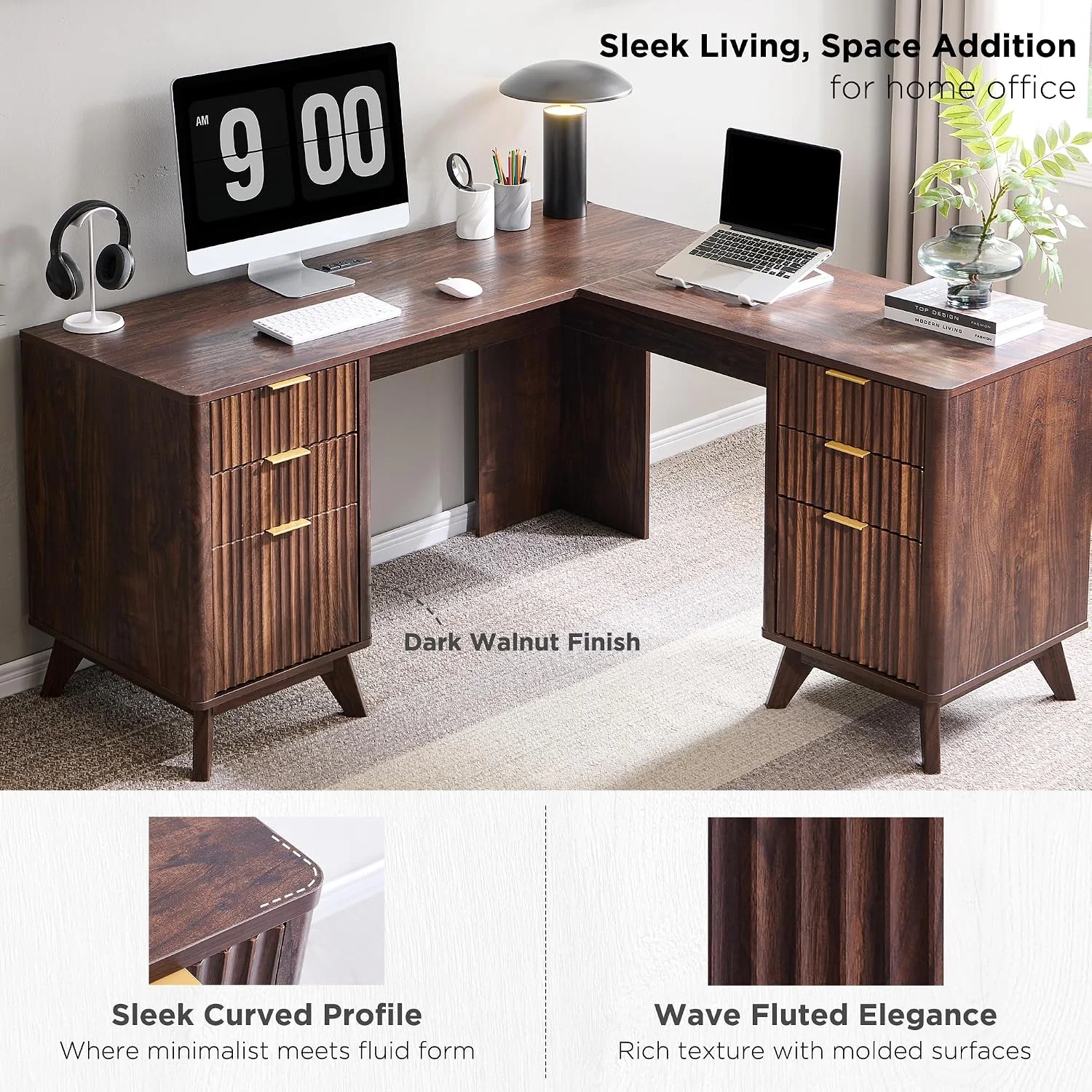
The T4TREAM 60-inch L-shaped desk is a corner computer desk with an attached charging station and built-in storage. It measures 60 inches on each side, comes in three finishes, and has a fluted front panel. Essentially, it aims to replace a desk, a filing cabinet, and a power strip.
The L shape is the whole point. A straight desk gives you a single surface, whereas this one gives you a main work zone plus a return. That return can hold a second monitor, a printer, a laptop dock, or a stack of files.
Storage also does more than sit under the desktop. According to the listing, you get a file drawer, three utility drawers, a cabinet with an adjustable shelf, and a compartment sized for a vertical CPU tower. For anyone who works with paper or a desktop PC, that layout answers real everyday problems.
Main Features and Build Quality
What Materials Is the T4TREAM Desk Made Of?
The listing says the desk uses FSC-certified wood and P2 engineered MDF, with a fluted panel design and curved edges. The top is engineered wood rather than solid wood. At this price that is normal, since it keeps the desk affordable and stable, but it won’t feel like heirloom furniture.
Engineered wood gets an unfair reputation. A good MDF core with a quality finish stays stable, resists warping, and takes color evenly, which matters for a deep shade like Dark Walnut. On the downside, it dislikes moisture, and screws can loosen if you move the desk more than once.
Another point worth flagging is the base. The listing describes it only as “stable and attractive,” which tells you very little. If leg construction matters to you, check the customer photos and Q&A section before buying.
How Does the Fluted Panel Design Look on a Desk?
Fluted panels are vertical grooves that add texture to a flat surface. On this desk they give the front a more designed look than a plain slab, and they suit modern, warm-toned rooms. On the other hand, the grooves catch dust, so expect occasional wiping.
Fluted styling has become popular in furniture lately, and it works well here because it breaks up a large front face. Without it, a 60-inch L-shaped desk can look like a big block of office furniture. Thanks to the grooves and curved edges, the overall shape feels softer.
From a practical standpoint, though, grooves collect dust and crumbs more readily than flat surfaces. A microfiber cloth handles the job, but if you hate cleaning, a plain finish may suit you better.
How Does the Built-In Charging Station Work?
The listing describes an integrated station with one USB port, one Type-C port, and two AC outlets. That covers a phone, a laptop charger, and a lamp or monitor. However, it does not state output wattage or surge protection, so check both before you plug in expensive gear.
This is the feature that caught my attention first. Reaching under a desk for an outlet is a daily annoyance, so having power at desk level removes a small but constant irritation.
Still, several details are missing from the listing:
- Charging speed: The wattage of the Type-C port isn’t listed, so it could be fast or slow.
- Surge protection: Nothing on the page says the station has it.
- Cable length: How far the power cord reaches from the wall isn’t stated.
- Total load: No maximum draw is given across the two AC outlets.
For a high-draw setup, such as a gaming PC with several monitors, plug the desk into a quality surge protector instead of relying on the station alone.
What Storage Does It Include?
The desk has one letter-size file drawer, three utility drawers, a cabinet with an adjustable shelf, and a compartment that fits a vertical CPU tower. As a result, files, stationery, chargers, and a desktop PC can all live in one piece of furniture without a separate cabinet.
Here is how the storage breaks down:
- File drawer (letter-size): Suited to hanging folders, contracts, and tax paperwork. Legal-size files, however, won’t fit.
- Three utility drawers: Ideal for pens, notebooks, cables, and small gadgets.
- Cabinet with adjustable shelf: Useful for books, a printer, a router, or a few storage boxes.
- CPU compartment: Keeps a vertical tower off your leg room and off the floor.
Before you order, measure your PC tower. The listing doesn’t give the compartment’s interior dimensions, so a quick tape-measure check saves a return later.
How Much Weight Can the Desktop Hold?
The listing says the desktop supports up to 150 lbs. That is plenty for two monitors, a laptop, a lamp, and a printer. It is not, however, built for heavy equipment such as large 3D printers or stacked server hardware.
Two 27-inch monitors on arms, a laptop, and desk accessories weigh far less than 150 lbs. The rating matters more if you plan to put a heavy printer or a stack of reference books on the return.
Workspace Benefits: What This Desk Changes for Your Day
How Does an L-Shaped Desk Improve Productivity?
An L-shaped desk improves productivity by separating tasks into zones. Your primary screens stay on one side, while paperwork or a second device sits on the other, so you turn instead of clearing space. It also uses corner space that a straight desk wastes.
The biggest benefit is workflow. On a straight desk, everything competes for the same 48 inches or so. With an L, the main leg holds your monitors and keyboard, and the return handles everything you reach for occasionally.
For example, here is how I would lay it out:
- Main leg: Dual monitors on arms, keyboard, mouse, desk lamp
- Return: Laptop dock, notebook, printer, or a dedicated writing area
- Drawers: Everything you would otherwise leave on the surface
- Charging station: Phone and headset, so cables stay off the desk
Does It Help With Cable Management and Clutter?
Partly. Built-in power and closed storage hide chargers and small items, which cuts visible clutter. However, the listing doesn’t mention grommets, cable trays, or routing channels, so you will probably still need clips or sleeves for monitor and PC cables.
The charging station reduces the number of cords running to the wall. Meanwhile, drawers and the cabinet move small items off the surface. Together, these do more for a tidy desk than any desktop organizer tray.
What the listing doesn’t describe is a dedicated cable-routing solution. For that reason, plan to add a cable tray or adhesive clips for monitor and peripheral cords.
How Does It Look in a Room?
The Dark Walnut finish has a warm, rich tone that suits modern and mid-century rooms, while Alder Grey and Natural Oak lean cooler and lighter. The fluted front adds visual interest. Even so, a 60 x 60 inch footprint is large and can dominate a small room.
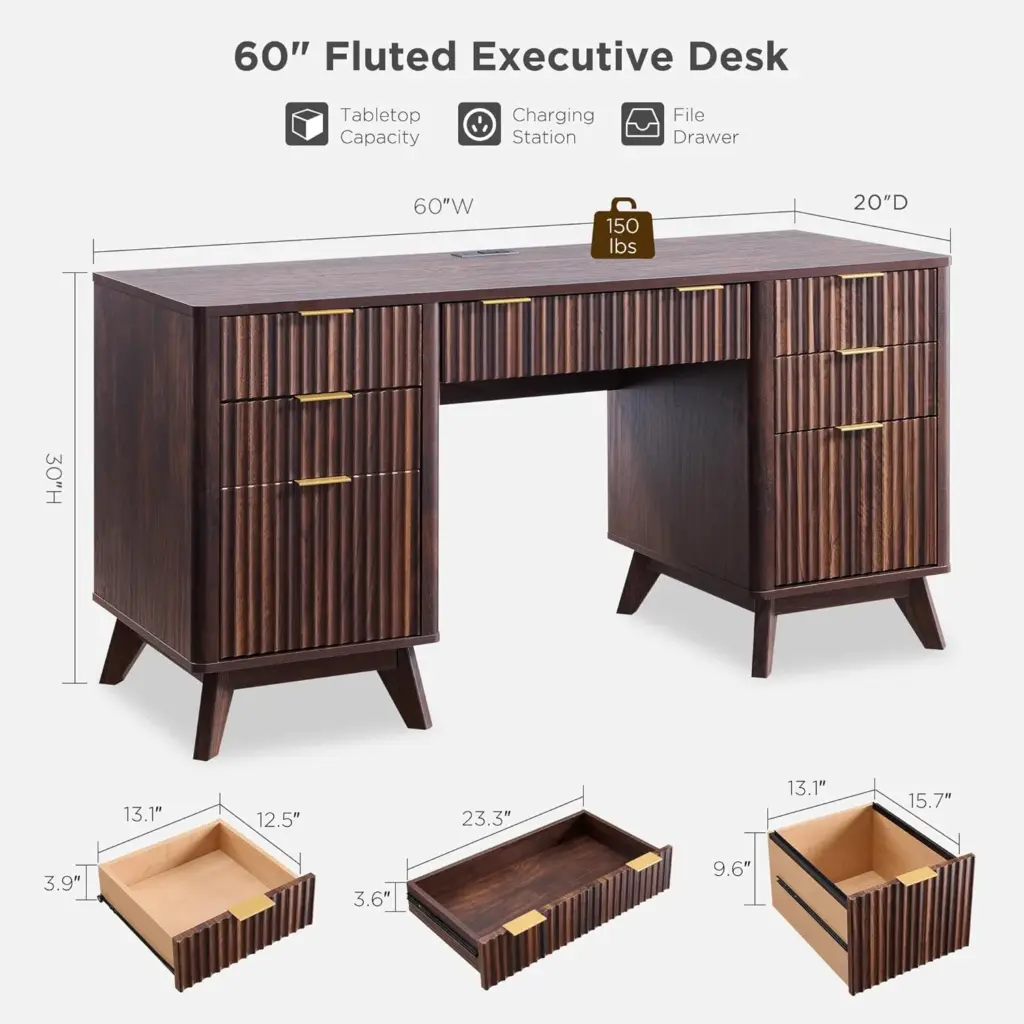
All three colors cost $389.99, so you can choose purely by room. Dark walnut looks upscale and hides fingerprints, but it can make a small room feel heavy. Natural Oak, by contrast, keeps things lighter, and Alder Grey works well in a cooler, minimalist setup.
My Hands-On Experience: What I Can and Can’t Tell You
I’m not going to invent an unboxing story. I haven’t assembled this desk, so I can’t describe how the drawer glides feel or how the finish looks in person. Made-up test notes would defeat the purpose of a review.
What I can share is what the listing supports:
- Packaging: According to the listing, the desk ships in two boxes with thick foam and protective panels.
- Assembly help: The seller says the instructions are clear and the parts are labeled.
- Support: A support team is available if something goes wrong.
Next, here is what I would check in the first few days of ownership. It works as a checklist for any large flat-pack desk:
- Inspect every panel for chips or corner damage before you start building.
- Count the hardware against the manual.
- Assemble on a soft surface, such as carpet or the flattened boxes, to protect the finish.
- Leave screws slightly loose until the frame is aligned, then tighten fully.
- Test the drawers for smooth travel before loading them.
- Wiggle-test the desk once your monitors are installed.
- Try the charging station with your own devices before trusting it.
If you are still deciding, read the recent one- and three-star reviews. They usually reveal how the hardware, alignment, and customer service hold up in real homes.
Ease of Use and Setup
How Hard Is It to Assemble an L-Shaped Desk?
Assembling an L-shaped desk with drawers and a cabinet is usually a multi-hour, two-person job. The listing promises clear instructions and labeled parts, but it doesn’t state assembly time or difficulty. Therefore, plan for a full afternoon and a helper for the heavy panels.
Since the listing gives no assembly time, I won’t quote one. Based on how desks like this are typically built, expect many panels, plenty of screws, and a few steps that need a second pair of hands. The corner join and drawer assembly are usually where things go wrong.
A few tips apply to any desk of this kind:
- Clear a space larger than the desk itself.
- Sort and lay out the hardware first.
- Keep the manual open and confirm each panel’s orientation.
- Hold off on fully tightening anything until the frame is square.
Is There a Learning Curve After Setup?
Not really. The desk has no motors, software, or adjustments beyond the cabinet shelf. The only thing worth planning is where each item lives, especially the charging station and CPU compartment, so you don’t have to rearrange after loading everything.
Decide your monitor positions and PC placement before final assembly. Otherwise, moving a loaded 60-inch L-desk later becomes a real chore.
You should also check the corner layout against your room. The listing doesn’t say whether the return can be flipped to the left or right, so confirm that before ordering if your room layout depends on it.
Performance and Durability
How Durable Is the T4TREAM Desk Likely to Be?
Durability for an engineered-wood desk depends mostly on hardware quality, load, and how often you move it. With a 150-lb desktop rating and FSC-certified MDF, it should handle normal home-office use. Water spills, heavy impacts, and repeated moves are another matter.
I can’t report long-term wear, and neither can the listing. Even so, a few factors usually decide how these desks age:
- Moisture: Wipe spills quickly, because MDF swells if water reaches an edge.
- Load: Keep heavy items near the legs rather than in the middle of the top.
- Moving: Each disassembly loosens the screw holes a little more.
- Drawers: Overloaded file drawers put stress on the runners.
Buyer sentiment looks solid, with a 4.5 out of 5 rating across 71 ratings. That said, it is a small sample, so read the critical reviews for recurring problems.
Is the Charging Station Safe to Use?
It is safe to use within its limits, but the listing doesn’t mention certifications, wattage, or surge protection. Look for a safety mark such as UL or ETL on the product or in the manual, and avoid plugging in high-draw appliances like heaters or laser printers.
I would treat the station as a convenience for phones, lamps, and a laptop charger. For a powerful PC and multiple monitors, use a surge protector plugged directly into the wall instead.
Pricing and Value
Is the T4TREAM L-Shaped Desk Worth $389.99?
For an L-shaped desk with four drawers, a cabinet, and built-in charging, $389.99 is competitive. You are paying for storage and convenience rather than premium materials. If you will use both, the value is strong; if not, a simpler desk costs less.
The price includes features that normally cost extra. Buying a plain L-shaped desk, a filing cabinet, and a power strip separately would add up quickly.
Here are the payment options from the listing:
- Full price: $389.99
- Installments: Four payments of $97.50, every two weeks
- Amazon Visa offer: $50 off instantly, bringing the price to $339.99 on approval
If the credit card offer applies to you, the effective price drops to $339.99. In that case, the value for this feature set gets even stronger.
Pros and Cons
Pros
- Large 60 x 60 inch L-shaped surface for dual monitors and paperwork
- Built-in charging station with USB, Type-C, and two AC outlets
- Letter-size file drawer, three utility drawers, and a cabinet with adjustable shelf
- Dedicated CPU compartment
- Fluted panel design and curved edges that look more premium than plain laminate
- Three finish options at the same price
- 150-lb desktop weight rating
- Two-box packaging with foam and protective panels, per the listing
- Solid 4.5/5 rating from 71 ratings
Cons
- Engineered wood construction rather than solid wood
- Large footprint that won’t suit small rooms
- Unlisted charging station wattage, surge protection, and certifications
- Vague base material description
- No height adjustment
- No stated assembly time or difficulty
- No mention of a reversible return
- Fluted grooves that collect dust
- A rating based on a fairly small number of reviews
Comparison With Competitors
Compared with similar L-shaped desks, the T4TREAM stands out for its storage and built-in power at a mid-range price. Cheaper L-shaped desks usually skip drawers and charging, while more expensive ones often add solid wood, height adjustment, or better finishes.
I haven’t tested competing desks side by side for this article. Consequently, the comparison below covers desk categories rather than specific models.
| Feature | T4TREAM 60″ L-Shaped | Budget L-Desk (typical) | Electric Standing L-Desk (typical) |
|---|---|---|---|
| Price range | $389.99 | Lower | Considerably higher |
| Built-in power | Yes | Rarely | Sometimes |
| Storage | 4 drawers + cabinet | Little or none | Usually minimal |
| Height adjustment | No | No | Yes |
| Material | Engineered wood | Particleboard/MDF | Engineered top, steel frame |
| Best for | Storage-heavy home office | Tight budgets | Ergonomics-focused users |
T4TREAM vs. a Standing L-Desk
If you want to stand for part of the day, this isn’t your desk. Standing L-desks cost more and usually offer less storage. As a workaround, you could pair the T4TREAM with an under-desk footrest for a comfortable seated setup, but it will never rise.

T4TREAM vs. a Basic L-Desk
Budget L-desks cost less, yet they usually give you only the surface. If you already own a filing cabinet and a power strip, a basic desk may be enough. Otherwise, the T4TREAM’s built-in extras start to pay for themselves.
Who Should Buy It? Who Should Skip It?
Who Should Buy the T4TREAM Desk?
Buy it if you need a large corner workspace with plenty of storage and built-in power. It suits remote workers, students, freelancers, and small-business owners who handle paperwork, use two monitors, or want a clean-looking home office without buying separate storage.
Good fits include:
- Remote workers with dual monitors
- Freelancers who keep client files
- Students with a dedicated study corner
- People using a desktop PC tower
- Anyone who wants a warmer, more designed look than a plain office desk
Who Should Skip It?
Skip it if your room is small, you want a standing desk, or you need solid-wood construction. It is also a poor fit if you need documented electrical specs for high-power equipment, or if you move apartments often.
Better alternatives for those cases:
- Small spaces: A compact 47-inch straight desk
- Ergonomic focus: An electric height-adjustable desk
- Frequent movers: A steel-frame desk that tolerates disassembly
- Heavy equipment users: A reinforced workstation rated for higher loads
Final Verdict: Should You Buy the T4TREAM L-Shaped Desk?
The T4TREAM 60-inch L-shaped desk is a strong value if you need a large workspace with real storage and built-in power. For $389.99, or $339.99 with the Amazon Visa offer, you get a corner desk with a file drawer, three utility drawers, a cabinet, a CPU compartment, and a charging station. That is a lot of function for the price.
Of course, there are trade-offs, and they are the usual ones for engineered wood. The footprint is big, nothing adjusts in height, and long-term durability depends on careful assembly. Moreover, the listing skips details I would want before plugging in expensive gear, especially the charging station’s specs.
My recommendation: Buy it if you have the space, want the storage, and will use the charging station for everyday devices. First, read recent critical reviews, measure your room and PC tower, and inspect everything on delivery. If you want a standing desk or have a small room, look elsewhere.
Rating: 4.3/5. This is my assessment of the listing’s specs and value, not a hands-on score. Amazon buyers, for comparison, rate it 4.5/5 from 71 ratings.
Frequently Asked Questions
What are the dimensions of the T4TREAM L-shaped desk?
The listing gives the dimensions as 60 inches deep, 60 inches wide, and 30 inches high. Before ordering, measure your room with extra clearance for the chair, drawers, and cabinet door.
How much does the T4TREAM L-shaped desk cost?
It is listed at $389.99 in all three colors. In addition, Amazon offers four payments of $97.50 every two weeks, and an Amazon Visa approval offer takes $50 off, for $339.99.
Does the desk have built-in charging?
Yes. The listing describes one USB port, one Type-C port, and two AC outlets. However, it doesn’t state charging wattage or surge protection.
What is the return policy?
The listing doesn’t state it. Check the return terms on the Amazon product page at checkout, and inspect the boxes and panels for damage as soon as they arrive.
Can a desktop PC tower go inside the desk?
The listing says a dedicated compartment fits a vertical CPU tower. Since it doesn’t give interior dimensions, measure your tower first.