
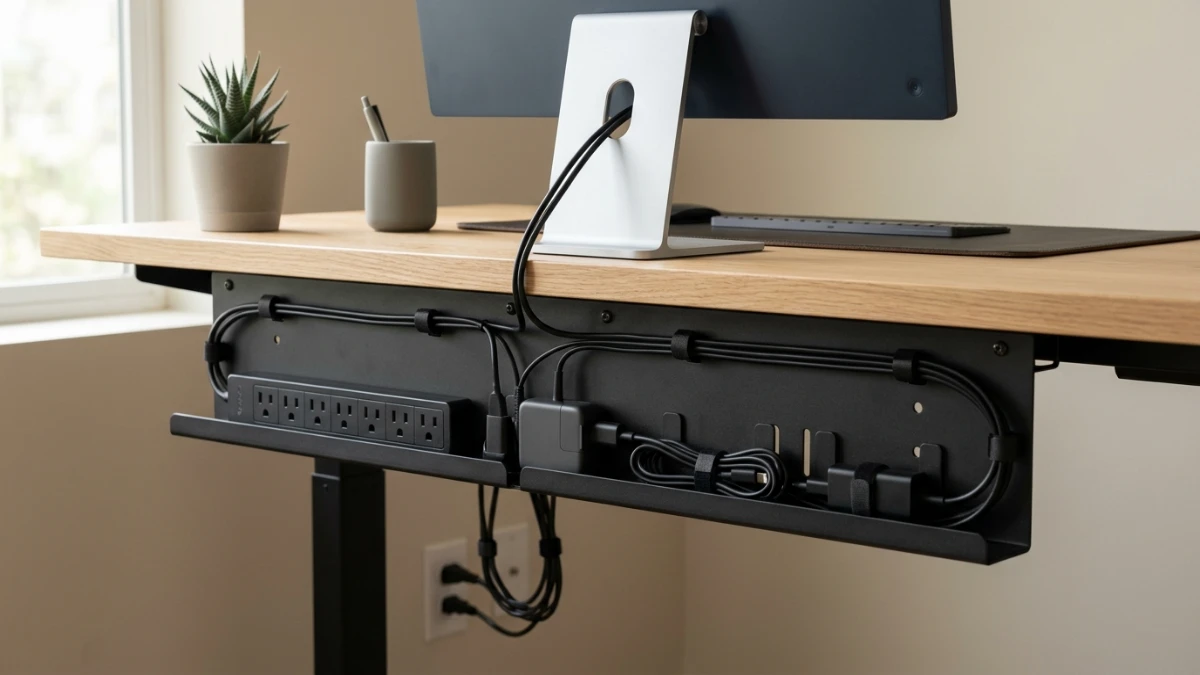
The best under-desk cable management tray depends on your desk size, cable load, and mounting preference. The Scanfield 17-inch two-pack suits smaller desks, while the Univivi 32-inch tray fits longer workstations. Choose the 32.6-inch ivory model for light-colored desks, the 25-inch tray for medium setups, or the PAMO steel set for modular organization. Measure your desk and verify mounting compatibility and load limits before buying.
Lead: Why Cable Trays Matter Now
Cable clutter ruins good desks. Even if you own the best monitor, chair, and keyboard, a tangle of cords under the desktop makes the whole setup look unfinished. Fortunately, an under-desk cable tray fixes this problem quickly.
A tray mounts beneath the desktop. Once installed, it holds power strips, adapters, and extra cable length out of sight. In addition, it keeps cords off the floor and away from your feet.
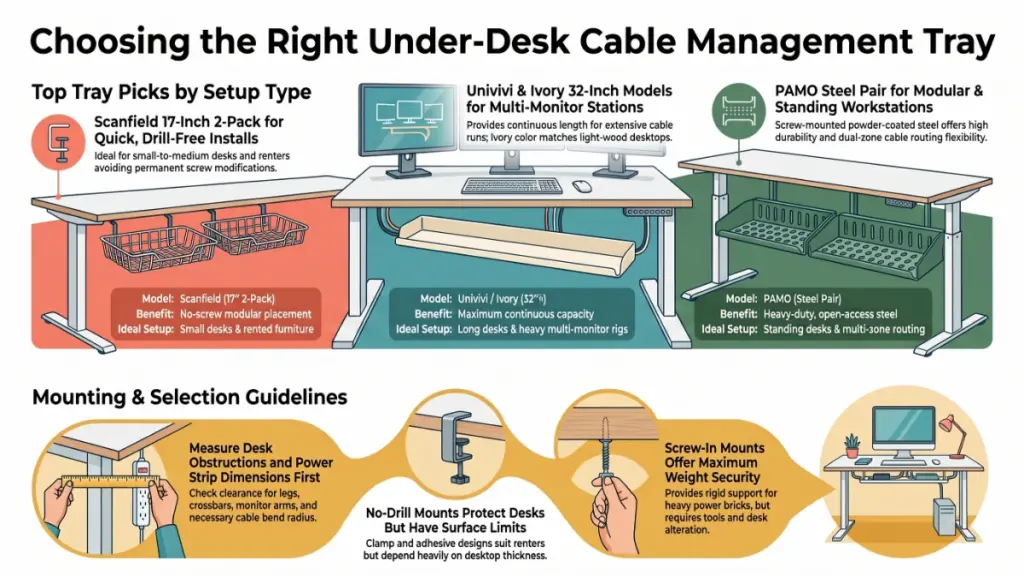
This guide compares five trays. First, Scanfield sells a 17-inch two-pack with an advertised no-screw design. Next, Univivi offers a 32-inch black tray. Meanwhile, a 32.6-inch ivory tray advertises a no-drill install. In the middle of the range, a 25-inch tray covers medium desks. Finally, PAMO sells a two-piece steel set that mounts with screws.
Here is my short answer. No single tray wins for every desk, because your desk length, mounting preference, and load decide the winner. For example, long multi-monitor desks suit the Univivi or the 32.6-inch ivory tray. Likewise, renters and drill-averse buyers should look at the Scanfield. Standing-desk owners with separate cable zones, on the other hand, should consider the PAMO set.
Please note that I have not lab-tested these products. Instead, I built this guide from advertised specifications and published listings. Therefore, I flag every claim you should verify before you buy.
Quick comparison
| Product | Best for | Size / design | Mounting (as advertised) |
|---|---|---|---|
| Scanfield Tray | Easy install | 17-inch, 2-pack | No-screw |
| Univivi Tray | Long desks | 32-inch, black | Verify on listing |
| 32.6-Inch Ivory Tray | Light desks | 32.6-inch, ivory | No-drill |
| 25-Inch Tray | Medium desks | 25-inch | Verify on listing |
| PAMO Set | Modular zones | Set of 2, black steel | Screw-in |
Check current prices on each Amazon listing. Because prices shift often, I will not quote a number I cannot confirm today.
Strategic Context: Who Benefits and What Changes
Remote work moved the office into bedrooms, spare rooms, and kitchen corners. As a result, many people now run a laptop, two monitors, a dock, speakers, a webcam, and a phone charger from one desk. Each device adds a cable, and those cables add up fast.
A tray changes three daily workflows.
First, it changes how you plug things in. Your power strip and adapters get a fixed home. Consequently, you stop crawling under the desk to find a loose plug. You simply open the tray, find the cord, and move on.
Second, it changes how you clean. Loose cables collect dust and block vacuum access. A mounted tray, however, lifts the mess off the floor. Afterward, you can sweep without moving anything.
Third, it changes how you rearrange. Grouped cables travel together. When you swap a monitor, for instance, you trace one bundle instead of five strands.
Several buyer types gain the most:
- Home-office workers who want a professional-looking background on video calls.
- Gamers who run consoles, PCs, and RGB accessories from one power block.
- Standing-desk owners who need organized slack for moving desks.
- Small-space renters who cannot drill into furniture they might leave behind.
- Creators with audio gear, lights, and cameras on one desk.
Cable management also supports safety. Loose cords create trip hazards, and tangled power strips on the floor attract pet chewing and spilled drinks. A tray lifts these items off the ground. Nevertheless, it does not make unsafe wiring safe, as I explain later.
Smart shopping matters here too. Cable trays vary widely in price, size, and build quality. Buyers who skip the measuring step often return their purchase. Therefore, a careful comparison saves both money and effort. That is exactly why I track these products closely in our Best Deals & Shop section.
Deep-Dive Specifications: What Each Tray Offers
Specs matter more than marketing names. Below, I break down each tray by the details in the published product information. Until you confirm a figure on the live listing, treat it as advertised only.
1. Scanfield Under Desk Cable Management Tray (17-inch, 2-pack, black)
The Scanfield set ships two 17-inch trays, which gives you flexibility. For example, you can dedicate one tray to a power strip and adapters. The second can then hold excess cable length.
The advertised no-screw design is the main draw. Buyers who dislike drilling will notice it first. Moreover, the black finish blends into dark desks and gaming rigs.
The trade-off is length. Each tray measures only 17 inches, so large power strips may not fit. Besides that, you should check the mounting mechanism, because not every no-screw system suits every desktop.
Best fit: Small to medium desks and buyers who avoid screws.
2. Univivi Under Desk Cable Management Tray (32-inch, black)
The Univivi tray targets long desks. Its advertised 32-inch length gives you one continuous organizing area. Consequently, it suits multi-monitor setups and docking-station builds.
A single long tray keeps related cables together. As a result, you avoid scattering them across several small organizers. The black finish also keeps the look clean.
On the downside, size can become a problem. A 32-inch tray can overrun a compact desk, and it can collide with crossbars, desk legs, or monitor-arm clamps. Measure first. Then verify the mounting method and load capacity on the listing.
Best fit: Long desks, multi-monitor stations, and heavy cable loads.
3. 32.6-Inch No-Drill Under Desk Tray (ivory)
This tray pairs a long layout with a light color. Most trays come in black, which stands out under a white or light-wood desk. In contrast, the ivory finish blends in better.
The advertised no-drill design suits buyers who want to protect their desktop. However, no-drill systems differ. Some use clamps, while others use adhesive or brackets. In addition, desktop thickness and material can limit compatibility.
Before you load it, confirm the attachment method, clearance needs, and weight limit. Above all, do this before you add a power strip.
Best fit: White, ivory, and light-wood desks.
4. 25-Inch Cable Management Under Desk Tray
The 25-inch tray sits between short and long options. Compared with a 17-inch tray, it offers more room. On the other hand, it needs less continuous space than a 32-inch model.
This size suits a desk with one monitor, a laptop charger, a keyboard, a mouse, and a few accessories. It may also fit places where longer trays cannot.
One warning applies. The source listing does not name a manufacturer or mounting method. For that reason, you must read the exact Amazon listing before you buy. Do not assume any detail about brand, capacity, or installation.
Best fit: Medium desks with a moderate cable count.
5. PAMO Cable Management Under Desk (set of 2, black)
PAMO takes a modular approach. Instead of one long tray, you get two separate steel organizers. You then place each one where cables gather.
The published specs describe powder-coated steel construction. The open, beveled shape gives you access to cables, adapters, and compatible power strips. Furthermore, the set uses screw-in mounting. Published dimensions list roughly 44 × 10 × 12 cm per organizer.
Package descriptions disagree on how many cable ties come in the box. Accordingly, confirm the contents on the exact listing you choose.
Screws give a firm mount when you attach them correctly to a suitable surface. On the flip side, they require tools and make a more permanent change to the desk.
Best fit: Standing desks, large workstations, and separate cable zones.
Performance and Evidence: How to Judge a Tray Without a Lab
Cable trays do not have benchmark scores, and no standard test ranks them. Instead, I use criteria that predict real-world results. Score each tray against these five measures.
Measure 1: Usable interior space
Advertised length is not usable space. Walls, lips, and mounting hardware eat into the interior. Thus, a “32-inch” tray may hold less than 32 inches of cable. Where the listing provides interior dimensions, compare those numbers.
Measure 2: Load rating
A tray that holds only cables faces a light load. By contrast, a tray that holds a power strip, a surge protector, and two bulky adapters faces a heavy one. Look for a stated maximum load. If the listing gives none, treat the tray as cable-only until you learn otherwise.
Measure 3: Mount security
Screw mounts grip the desktop through fasteners. Their strength depends on the desk material and thickness. For instance, thin particleboard can strip, and hollow-core panels may not hold screws well.
No-drill mounts rely on clamps or other mechanisms. Their strength also depends on desktop thickness and surface. A clamp that fits a thin desk, for example, may slip on a thick one.
Measure 4: Access
You will reach into the tray often. For that reason, open-access designs help. A tray that forces you to unmount it before you swap a cable will frustrate you. The PAMO’s open, beveled shape aims at exactly this problem.
Measure 5: Fit with your desk
Obstructions decide most purchases. Check for drawers, crossbars, support legs, and monitor-arm clamps. On a standing desk, additionally check clearance at both the lowest and highest height.
How the five trays score on likely fit
| Tray | Strongest on | Watch out for |
|---|---|---|
| Scanfield | Install ease, two zones | Short 17-inch length |
| Univivi | Capacity of cable run | Overrunning small desks |
| 32.6-Inch Ivory | Color match, no-drill | Mount compatibility |
| 25-Inch | Middle-size balance | Unknown brand and mount |
| PAMO | Steel build, access | Screw install effort |
This table reflects advertised features, not lab results. Use it to narrow your shortlist. Afterward, verify the details.
A practical test you can run yourself
Before you buy, run a two-minute check:
- Measure the free space under your desktop, front to back and side to side.
- Note every obstruction, such as legs, drawers, and crossbars.
- Lay out your power strip and largest adapters on the floor.
- Measure that group’s total length and height.
- Finally, compare the numbers with the tray’s interior dimensions.
If the group does not fit with room to spare, pick a bigger tray. Cables need bend space. Likewise, tight packing traps heat around power supplies.
Pricing, Licensing, and Availability
Cable trays sell through Amazon and other major retailers. Prices change often, because they shift with seasons, promotions, and stock levels. For this reason, I do not list a fixed price here. An outdated number would only mislead you.
Use these habits to find a fair deal:
- Compare per-piece cost. A two-pack looks pricier than a single tray. Therefore, divide the price by the piece count before you decide.
- Check the exact listing. Titles repeat across sellers, so the same tray may appear under several names.
- Watch package contents. Some listings include screws, cable ties, or adhesive pads. Others do not, and missing hardware adds cost.
- Read the return policy. Fit problems drive returns. Easy returns therefore protect you if the tray does not clear your desk’s crossbars.
- Track price history. Deal trackers show whether a “sale” price is truly low.
Availability also varies by region. While some trays ship quickly in one market, they may arrive slowly in another. Consequently, confirm delivery windows before you plan an install weekend.
Licensing does not apply to physical desk accessories. Warranty terms, however, do. Look for a seller-stated warranty or satisfaction guarantee. A listing without one deserves extra caution.
I track these trays for Best Deals & Shop and update the picks when prices or listings change. If you spot a listing change that I should review, email me at [email protected].
Industry Implications and Competitive Analysis
Trays compete with several other cable solutions. Each one solves a slightly different problem. Before you commit, weigh these alternatives.
Tray vs. cable sleeves and wraps
Sleeves bundle cables into one tidy tube. They look neat and cost little. However, they do not hold a power strip, and they do not lift cables off the floor. For best results, use sleeves together with a tray, not instead of one.
Tray vs. adhesive clips and cable holders
Clips guide single cables along desk edges and legs. They help with routing, but they do not store adapters or excess length. Moreover, adhesive can fail on textured or dusty surfaces.
Tray vs. mesh baskets and wire racks
Wire baskets offer strong airflow and easy visibility, and many hold heavy loads. Still, they can look bulkier than a solid tray. In addition, they expose cables to more dust than a closed design would.
Tray vs. power-strip mounts
A dedicated mount holds only the power strip. That approach saves space and cost. Nevertheless, it leaves adapters and slack uncontained, whereas a tray covers more items at once.
Tray vs. desk grommets and cable pass-throughs
Grommets let cables pass through the desktop and keep the surface clean. However, they require a hole in the desk, which commits you to a permanent change. Trays work well beside a grommet because they catch the cables once they drop through.
Competitive position of the five picks
Within the tray category, the five products split into clear lanes:
- No-screw convenience: Scanfield.
- Long continuous run: Univivi and the 32.6-inch ivory tray.
- Middle length: The 25-inch tray.
- Modular steel: PAMO.
The ivory tray also stands alone on color. Most competitors favor black. Since light-desk owners rarely get a matching option, that finish gives the ivory tray a real edge.
What the market trend suggests
Buyers increasingly ask for no-drill options. Renters, students, and shared-office workers drive this demand, because they want tidy desks without permanent changes. Sellers respond with clamp and adhesive designs, so expect more of them.
Color choice matters as well. Light-wood and white desks stay popular in home offices. Accordingly, I expect more ivory and white trays to appear.
Meanwhile, steel trays keep their appeal. They offer rigid support for heavy power strips. As long as buyers need strength, they will keep choosing screw-mounted steel.
Limitations, Caveats, and Skepticism
No guide can remove every risk. Therefore, read these caveats before you buy.
Advertised specs are not verified specs
I based this guide on published listings, and sellers write those listings. They may overstate capacity or understate fit problems. Because I have not weighed, loaded, or stress-tested these trays, you should verify dimensions and load limits yourself.
Missing brand data
The source listing for the 25-inch tray lacks a named manufacturer. Without a brand, you cannot easily check warranty terms or support. For that reason, treat this tray with extra caution.
“No-drill” does not mean “fits everything”
No-drill systems use different methods. Clamps need the right desktop thickness, and adhesives need clean, flat surfaces. Glass desks, in particular, need special care. Never assume a standard tray suits glass. Instead, use only products the maker approves for your desktop material and thickness.
Electrical safety remains your job
A tray organizes cables, but it does not increase electrical capacity. Do not overload a power strip or an outlet. Additionally, some power supplies need airflow, so avoid packing them tightly together. Follow the manufacturers’ instructions for both the tray and the power strip, and never cover ventilation openings.
Standing desks add risk
Height-adjustable desks move, so cables need enough slack for the full range. Too little slack can pull plugs loose or damage connectors. After you install the tray, test the complete movement range slowly.
Package contents vary
PAMO listings differ on included cable ties. Other trays may differ on screws or pads. Thus, confirm the box contents before you order. If the listing is unclear, buy extra reusable ties.
Common mistakes that cause failures
- Skipping the measurement. A long tray can hit desk supports.
- Ignoring load limits. Power strips weigh more than they look.
- Overtightening ties. Pressure can damage cable jackets.
- Blocking airflow. Heat builds around packed power bricks.
- Forgetting movement. Standing desks need cable slack.
How to Install a Tray: A Six-Step Plan
Good planning prevents most installation problems. To begin, follow these steps.
Step 1: Unplug and identify. Turn off and unplug the equipment. Then sort monitor cables, USB cords, chargers, and power connections.
Step 2: Measure the area. Check length, width, and depth under the desktop. Look for drawers, crossbars, and supports.
Step 3: Position the tray. Pick a spot that keeps cables reachable. Keep it clear of your knees, chair, and any desk mechanism. On a standing desk, check clearance at both extremes.
Step 4: Attach it. Follow the supplied instructions. Respect the desk-thickness range, torque guidance, and weight limit.
Step 5: Organize the cables. Route cords into the tray. Next, group related cables with reusable ties or straps, and take care not to pinch them.
Step 6: Test the setup. Reconnect the equipment. Afterward, check for pinched or stretched cables. On a height-adjustable desk, run the full range carefully.
No-drill vs. screw-mounted at a glance
| Feature | No-drill tray | Screw-mounted tray |
|---|---|---|
| Installation | Usually easier | Needs tools |
| Desk changes | Typically none | May need holes |
| Compatibility | Depends on clamp design | Depends on material and thickness |
| Removal | Often simpler | Requires removing screws |
| Ideal buyer | Renters, drill-averse users | Permanent installs |
Neither method wins outright. Instead, pick the one that matches your desk and your tolerance for permanent changes.
Frequently Asked Questions
What is the best under desk cable tray?
It depends on your desk size, cable count, and mounting preference. For example, Scanfield suits buyers who want a no-screw two-pack, while PAMO suits buyers who want a screw-mounted steel pair.
Is a no-drill tray better?
It helps when you want to avoid holes. Even so, suitability still depends on the mount design, desktop thickness, and load.
What size should I buy?
Measure your free under-desk space first. Smaller desks may suit 17-inch trays, whereas larger desks may need 25-inch or 32-inch models.
Can I put a power strip in a tray?
Only if the tray and the strip suit that arrangement. Follow both manufacturers’ instructions and avoid covering vents. Above all, never exceed electrical or weight ratings.
Do trays work on standing desks?
Yes, provided the tray fits the desk and your cables have slack for the full height range.
Can I use a tray on a glass desk?
Do not assume so. Use only trays approved for your desktop material and thickness.
Future Outlook and Conclusion
Cable management is moving toward easier installs and better looks. Buyers want tidy desks without permanent changes, and sellers will keep answering that demand. As a result, expect more no-drill designs, more light-color finishes, and more modular sets.
Watch three things when you shop. First, look for clearer load ratings on listings, since honest specs separate good sellers from weak ones. Second, favor named brands with real warranties. Third, keep an eye on price swings around major sales seasons.
In summary, here is my final guidance:
- Pick the Scanfield if you want a no-screw two-pack and have a small or medium desk.
- Choose the Univivi if you run a long, multi-monitor desk.
- Go with the 32.6-inch ivory tray if you have a light desk and want to skip drilling.
- Consider the 25-inch tray if you want a middle size and will verify the listing details.
- Select the PAMO set if you want steel and separate zones, and you accept screws.
Measure first. Then check the mount and the load rating. After that, you can buy with confidence.